- The customer bought a Warranty for a product.
- The customer has requested for a service of a product
Behind-The-Wheel Driving Test At Santa Clara DMV
Driving is independence.It is an important skill that everyone should learn. But how I got my driving license? That is a long story.
My Pareneting - My Style
Parenting is hard and I am learning something new daily.I am sharing my experience, my stories and how I am amazed to see her growing.
Showing posts with label Oracle Service Contracts. Show all posts
Saturday, June 17, 2017
Process Flow for a Service order in Order Management
There might be some requirements, where we need to bill the customer for the products we sold. But we don't have to ship the product.
Example:
Oracle Order Management enables us to utilize Oracle Workflow to manage the service lines in a sales order. Steps to achieve the above requirement.
1. Create a service item
2. Create a order type with the line type as BILL ONLY
3. Create a sales order with the order type created above
4. Process the sales order to create invoice
Friday, June 16, 2017
Create a Service Item in Oracle
To create a service item:
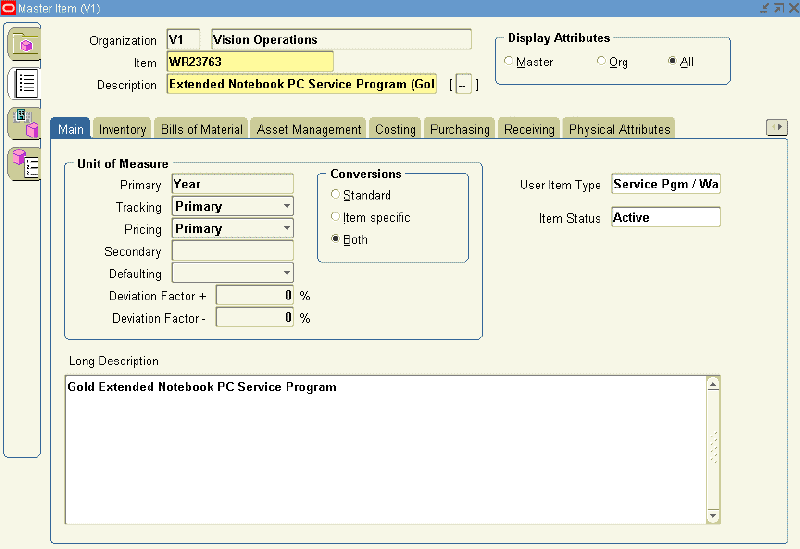
- Open Oracle Inventory and navigate to Inventory. Select Items, and then select Master Items.
- If prompted, enter an Organization.
The Master Items window appears. - Enter an item.
- Enter a description.
- From the Main tab:
- Select the User Item Type, Service Pgm / Warranty.
- Select a unit of measure (UOM), from the Primary LOV.
Note: You set up a service using a time UOM, such as Year, not a quantity UOM, such as Each.
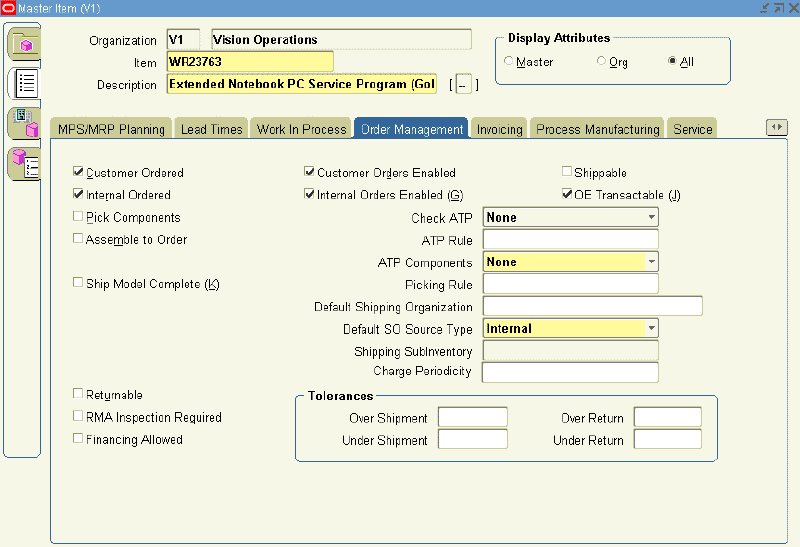
- Select the Order Management tab:

- Select the Customer Ordered check box.
The Customer Orders Enabled check box is automatically selected. - Select the OE Transactable check box.
- Select the Internal Ordered check box.
The Internal Ordered Enabled check box is selected automatically.
- Select the Customer Ordered check box.
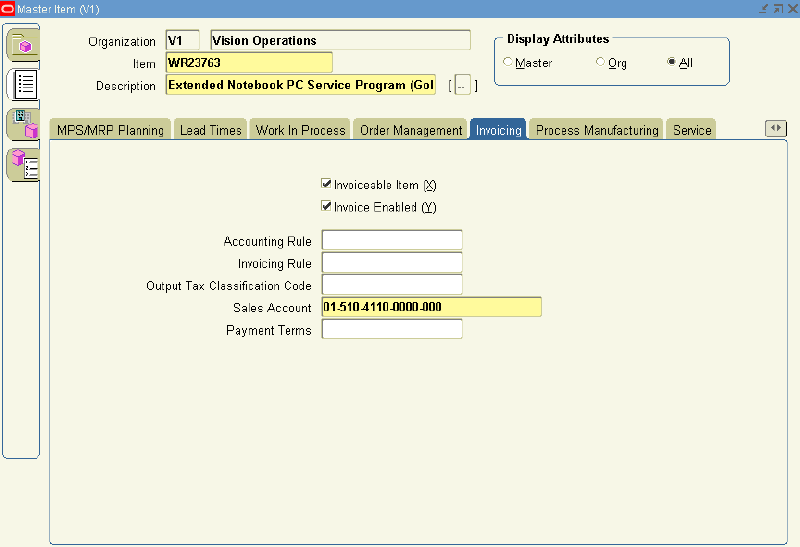
- Select the Invoicing tab:

- Select the Invoiceable Item and Invoice Enabled check boxes
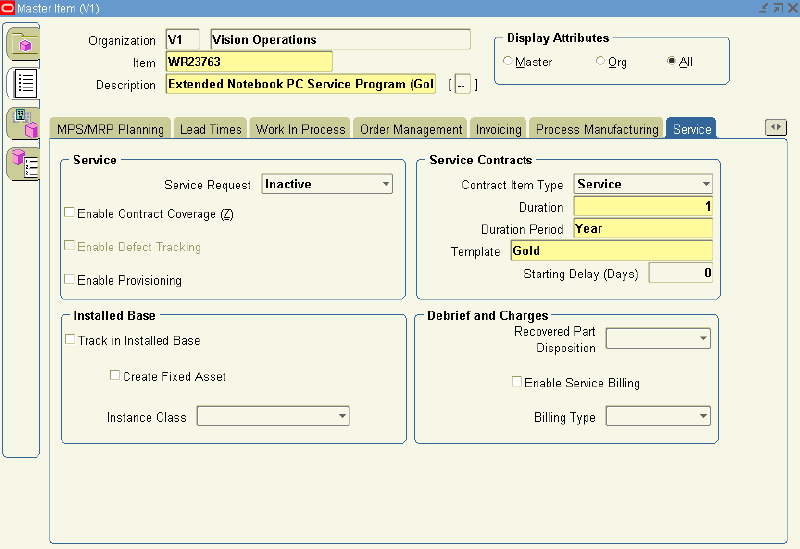
- Select the Service tab.

- In the Contract Item Type, select Service from the LOV.
- Select a Duration and Duration Period.
The duration and duration period are used for passing the service duration for the service item, when it is selected in the Oracle Quoting application. - From the Template LOV, select a coverage template.
- Save.
Friday, June 9, 2017
Create an Extended Warranty Contract with Monthly Billing From Order Management
In releases prior to 12.2.2, when an Extended Warranty is invoiced through Order Management, the invoice amount is for the entire duration of the Extended Warranty. Hence, Flexible billing schedules are not possible in the prior releases.
As from release 12.2.2, additional billing options have been introduced for Extended Warranties which allow flexibility as to how billing is done. The options are as follows:
The following attributes are managed in Order Management and interfaced to Service Contracts:
Contract Effectivity:
As from release 12.2.2, additional billing options have been introduced for Extended Warranties which allow flexibility as to how billing is done. The options are as follows:
- Retain the existing behavior of generating an invoice for the entire duration from Order Management.
- Generate the invoice for the first installment from Order Management and for the subsequent installments from Service Contracts.
- Generate invoices for all installments from Service Contracts. In this scenario, Order Management does not generate any invoices.
The following attributes are managed in Order Management and interfaced to Service Contracts:
Service Billing Option:
A list of values (LOV) field and the values are maintained in Service Contracts.The following values are available:
Full Billing from Order Management: When a contract (Extended Warranty or Service Agreement or Subscription Agreement) is created from OM; the contract is billed completely from OM. This doesn’t allow users to have multiple billing periods.
Full Billing from Service Contracts:When a contract (Extended Warranty or Service Agreement or Subscription Agreement) is created from OM, the contract is billed completely from OKS.This allow users to have multiple billing periods.
First Period Billing from OM, subsequent from Contracts: First period is billed from OM and the rest from OKS. Periodic Billing Amounts are calculated and maintained based on the amount billed in OM. This allow users to have multiple billing periods.
Service Billing Profile:
The Service Billing Profiles are templates used to specify
- Simple periodic billing schedules
- Accounting rules
- Invoicing rules.
Service Billing Profile information is specified for the subscription or service item in the Sales Order line.
- Simple periodic billing schedules
- Accounting rules
- Invoicing rules.
Service Billing Profile information is specified for the subscription or service item in the Sales Order line.
Service Coverage Template:
Optional, A list of values (LOV) field and the values are maintained in Service Contracts.
Optionally, select from the list of values that displays all active templates. Service Contracts uses this value for creating the contract. The field is enabled only for Extended Warranty lines. We cannot edit or update the coverage template details in Order Management. If we do not specify a template in Order Management, then Oracle Service Contracts populates the value (taken from the Item Master). We can update the coverage template on the order line when line status is either 'Entered', 'Booked' or 'Awaiting Fulfillment' and it is yet to be interfaced to Service Contracts.
Ensure to define service coverage templates in Oracle Service Contracts.
Service Start Date (e.g. 01-JAN-2014),
Service End Date (e.g. 31-DEC-2014),
Service Duration (e.g. 12) ,
Service Period (e.g. Months);
First Period Bill Amount (calculated and displayed);
First Period End Date (calculated and displayed).
First Period Bill Amount (calculated and displayed);
First Period End Date (calculated and displayed).
Categories of Oracle Service Contracts
There are 4 categories of Service Contracts:
- Warranty
- Extended Warranty
- Subscription Agreements
- Service Agreements
Warranty - The Service that are generally given away for free when the customer purchases a product. For the purpose of Oracle Service Contracts, warranties are always free of charge and are created automatically by Oracle Order Management when a product is sold.
Extended warranty - The Service that are generally sold to the customer at an additional cost at the time their products are purchased. We can sell the extended warranty contract using Oracle Order Management at the time the product is sold or we can also sell extended warranty contracts separately after the product is sold from Order Management or Oracle Service Contract Module.
These contracts often take advantage of the ability to bill on a recurring basis either monthly, quarterly or annually and can give the customer the ability to pay for their services in advance or in arrears of the period of service.
Subscription Agreements - The service/products that can also be sold for both tangible and intangible items and that often have monetary benefits involved for customers. Tangible items include magazines, collateral, or any other physical item that can be shipped through Oracle Order Management. Intangible items can be collateral sent via e-mail or permission to access a web site for a set period of time.
Service Agreements - (also referred as Service Contracts) are contracts those are sold to customers to repair, support / maintain product or services that a customer has or sold by the vendor / seller. All the services agreements bind within the boundaries of terms and conditions that is associated with the contract.
Service agreement give the flexibility to bill the customer on a recurring basis like Monthly, Quarterly, Half yearly or annually and gives customer the ability to pay in advance or in arrears. Service agreements can be created manually or created automatically from Order Management.