Showing posts with label Oracle Notebook. Show all posts

Tuesday, July 25, 2017

Lockbox in AR

AutoLockbox (or Lockbox) is a service that commercial banks offer corporate customers to enable them to outsource their accounts receivable payment processing. A lockbox operation can process millions of transactions a month. AutoLockbox eliminates manual data entry by automatically processing receipts that are sent directly to the bank. 

AutoLockbox is a three step process: 

    1. Submit Import: During this step, Lockbox reads and formats the data from your bank file into AutoLockbox tables using an SQL *Loader script.
    2. Submit Validation: The validation program checks data in the AutoLockbox tables for compatibility with Receivables. Once validated, the data is transferred into QuickCash tables. At this point, we can optionally query the receipts in the QuickCash window and change how they will be applied before submitting the final step, Post QuickCash. 
    3. Submit Post QuickCash: This step applies the receipts and updates your customer's balances. 
These steps can be submitted individually or at the same time from the submit Lockbox Processing window. After we run Post QuickCash, Receivables treats the receipts like any other receipts; 


Lockbox Process Flow
Lockbox Interface Table:

When you run the Import step of AutoLockbox, Receivables stores receipt data from the bank file in the Lockbox Interface table AR_PAYMENTS_INTERFACE

Oracle Autoinvoice Interface Tables

AR Invoice Interface Tables
  • RA_INTERFACE_LINES_ALL
- This table stores transaction header and line information.
- AutoInvoice uses Transaction Flexfields to uniquely identify each transaction that we import  into Receivables.
- AutoInvoice always uses the Line Transaction Flexfield structure for both the Link-to and Reference information when importing invoices
  • RA_INTERFACE_DISTRIBUTIONS_ALL
-  If we do not use AutoAccounting, we must enter accounting distributions for the transactions.
- If the accounting distributions are for transactions that use accounting rules, we must enter the percentages, but not the amounts.
- If the accounting distributions are for transactions that do not use accounting rules, we can enter either the percentages or amounts, depending on the value we entered for the batch source.
- Distributions in this table are linked to the appropriate transaction lines in the ra_interface_lines via the transaction flexfield. Though the distribution for 'REC' account class is at the invoice level, it may be linked to any transaction line of the invoice in ra_interface_lines. AutoInvoice will then correctly transfer all distributions to RA_CUST_TRX_LINE_GL_DIST_ALL.


  • RA_INTERFACE_ERRORS_ALL
- This table stores information about interface lines that failed validation and were not imported into Receivables tables.
- Receivables uses the information in this table to generate the AutoInvoice Validation Report - - AutoInvoice identifies all errors for each transaction line, thus reducing multiple validation and correction cycles. When we resubmit AutoInvoice, the program deletes the errors for each line selected for processing. When all of the records have been successfully processed, AutoInvoice purges any remaining data in this table.
- Use the Interface Exceptions window to view all of the errors in
 RA_INTERFACE_ERRORS_ALL.


  • RA_INTERFACE_SALESCREDITS_ALL
- This table stores sales credit information for the transactions.
- This table must be populated if the AutoAccounting is set up to derive segment values based on the salesrep. If AutoAccounting does not depend on salesrep, then the value we enter in the Required Salesrep field of the System Options window and Allow Sales Credits field in the Transaction Sources window will determine whether we must enter sales credit information.

    Monday, July 24, 2017

    Sequence Of Firing Triggers In Oracle Forms

    Navigational events occur at different levels of the Form Builder object hierarchy (Form, Block, Record, Item). Navigational triggers fire in response to some navigational events in the below order:
    - Logon Triggers are fired first in below sequence:
    1.PRE-LOGON
    2.ON-LOGON
    3.POST-LOGON
    - After that, Pre Triggers are fired
    1. PRE-FORM
    2. PRE-BLOCK
    3. PRE-TEXT-ITEM
    - After that, WHEN-NEW Triggers are fired
    1. WHEN-NEW-FORM-INSTANCE
    2. WHEN-NEW-BLOCK-INSTANCE
    3. WHEN-NEW-RECORD-INSTANCE
    4. WHEN-NEW-ITEM-INSTANCE
    - After this focus is on the first item of the Block. If we type some data and press the tab key following trigger will fire in sequence
    1.KEY-NEXT-ITEM (This trigger is present on the item level).
    2.POST-CHANGE (This trigger is present on the item level).
    3.WHEN-VALIDATE-ITEM (This trigger is present on the item level).
    4.POST-TEXT-ITEM (This trigger is present on the item level).
    5.WHEN-NEW-ITEM-INSTANCE (Block Level Trigger).
    - After That, POST TRIGGERS are fired
    1. POST-BLOCK
    2. POST-FORM

    Thursday, July 6, 2017

    Kill Session in Oracle

    Retrieve session identifiers and session serial number (which uniquely identifies a session's objects):
    select sid, serial# from v$session where username = 'USER'
    kill the session:
    alter system kill session 'sid,serial#'
    Disconnect the session:
    alter system disconnect session 'sid,serial#' post_transaction;
    
    alter system disconnect session 'sid,serial#' immediate;

    Collection and Record In Oracle

    collection is an ordered group of elements, all of the same type. 

    In a collection, the internal components are always of the same data type, and are called elements. We can access each element by its unique subscript. e.g. Lists and arrays.

    record is a group of elements, which can be of different types. 

    In a record, the internal components can be of different data types, and are called fields. We can access each field by its name. A record variable can hold a table row, or some columns from a table row. Each record field corresponds to a table column.
    PL/SQL has 3 collection types as below:
    • Index-by tables, also known as associative arrays,  are sets of key-value pairs, where each key is unique and is used to locate a corresponding value in the array. The key can be an integer or a string.
    •  Nested tables hold an arbitrary number of elements. They use sequential numbers as subscripts. We can define equivalent SQL types, allowing nested tables to be stored in database tables and manipulated through SQL.
    • Varrays (short for variable-size arrays) hold a fixed number of elements (although we can change the number of elements at runtime). They use sequential numbers as subscripts. We can define equivalent SQL types, allowing varrays to be stored in database tables. They can be stored and retrieved through SQL, but with less flexibility than nested tables.


    Collection Type
    Number of Elements
    Subscript Type
    Dense or Sparse
    Where Created
    Associative array (or index-by table)
    Unbounded
    String or integer
    Either
    Only in PL/SQL block
    Nested table
    Unbounded
    Integer
    Starts dense, can become sparse
    Either in PL/SQL block or at schema level
    Variable-size array (varray)
    Bounded
    Integer
    Always dense
    Either in PL/SQL block or at schema level

    Friday, June 30, 2017

    DENSE_RANK in Oracle/PL-SQL

    DENSE_RANK Function:
    • Returns the rank of a value in a group of values.
    • A built in analytic function which is used to rank a record within a group of rows. 
    • Return type is number and serves for both aggregate and analytic purpose in SQL.
    • Rows with equal values for the ranking criteria receive the same rank.
    • The ranks are consecutive. No ranks are skipped if there are ranks with multiple items.

      Examples:
      1.  Query to return the dense_rank for a $50000 salary(Single Column DENSE_RANK)

      SELECT DENSE_RANK(50000) WITHIN GROUP
      (ORDER BY salary DESC NULLS LAST) SAL_RANK
      FROM employees;


      2 Query to return the dense_rank for an employee with a salary of $50,000 
      and a commission of 10%$(Multiple Column DENSE_RANK)

      SELECT DENSE_RANK(10,50000) WITHIN GROUP
      (ORDER BY commission_pct, salary) SAL_RANK
      FROM employees;

      3. Query to rank the employees in department '60' based on their salaries. Identical salary values receive the same rank. However, no rank values are skipped. 
      SELECT department_id, last_name, salary,
             DENSE_RANK() OVER (PARTITION BY department_id ORDER BY salary) DENSE_RANK
        FROM employees 
        WHERE department_id = 60
        ORDER BY DENSE_RANK, last_name;


    RANK In Oracle/ PL-SQL

    RANK Function:
    • Returns the rank of a value in a group of values.
    • A built in analytic function which is used to rank a record within a group of rows. 
    • Return type is number and serves for both aggregate and analytic purpose in SQL.
    • Rows with equal values for the ranking criteria receive the same rank.
    • Ties are assigned the same rank, with the next ranking(s) skipped. So, if we have 3 items at rank 2, the next rank listed would be ranked 5.
    Examples:

    1.  Query to return the rank for a $50000 salary(Single Column RANK)


    SELECT RANK(50000) WITHIN GROUP
    (ORDER BY salary DESC NULLS LAST) SAL_RANK
    FROM employees;

    2.  Query to return the rank for an employee with a salary of $50,000 and a commission of 10%$(Multiple Column RANK)

    SELECT RANK(.10,50000) WITHIN GROUP
    (ORDER BY commission_pct, salary) RANK
    FROM employees;


    3.  Query to find the employee with the nth highest salary

    SELECT *
    FROM (
      SELECT employee_id, last_name, salary,
      RANK() OVER (ORDER BY salary DESC) EMPRANK
      FROM employees)
    WHERE emprank = n;


    4. Query to rank the employees  in department 60 based on their salaries. 
    Identical salary values receive the same rank and cause nonconsecutive ranks.


    SELECT department_id, last_name, salary,
        RANK() OVER (PARTITION BY department_id ORDER BY salary) RANK
      FROM employees WHERE department_id = 60
      ORDER BY RANK, last_name;

    Friday, June 23, 2017

    Bulk Collect - Save Exceptions

    The SAVE EXCEPTIONS clause will record any exception during the bulk operation, and still continue processing.
    BULK COLLECT construct is used to work with batches of data rather than single record at a time. Whenever we have to deal with large amount of data, bulk collect provides considerable performance improvement.

    Declare 
    cursor cur_emp 
    is 
    select * from Emp; 
      
    type array is table of c%rowtype;
    l_data array; 
    dml_errors EXCEPTION; 
    PRAGMA exception_init(dml_errors, -24381); 
    l_errors number; 
    l_errno number; 
    l_msg varchar2(4000); 
    l_idx number;

    Begin 

    open cur_emp;
    loop 
     fetch cur_emp bulk collect into l_data limit 100;
    begin forall i in 1 .. l_data.count SAVE EXCEPTIONS 
     insert into t2 values l_data(i);
    exit when cur_emp%notfound;
    end loop;
    close cur_emp;

    Exception

    when DML_ERRORS 
    then
    l_errors := sql%bulk_exceptions.count;
    for i in 1 .. l_errors
    loop
    l_errno := sql%bulk_exceptions(i).error_code;
    l_msg := sqlerrm(-l_errno);
    l_idx := sql%bulk_exceptions(i).error_index;

    DBMS_OUTPUT.PUT_LINE(‘Error #’ || i || ‘ occurred during ‘||‘iteration #’ || l_idx);

    DBMS_OUTPUT.PUT_LINE(‘Error message is ‘ || l_msg);
    end loop;
    end;
    /


    Approval Management(AME) in Oracle Order Management


    Oracle Approvals Management (AME) is a self‐service web application that enables us to define business rules governing the process for approving transactions in Oracle applications that have integrated AME. 

    In R12.2.2, Order Management integrates with Oracle Approval Management (AME) to leverage the robust capabilities of the approval rules engine to dynamically determine the list of approvers for Quotes, Sales Agreements and Returns (RMA). 
    Order Management has been integrated with Oracle Approval Management for the workflow "Negotiation Flow - Generic with Approval" and "Order Flow - Mixed or Return with Approval" to provide an additional option to use Approvals Management Engine (AME) for the approval mechanism of order lines with the above work flows.
    We can enable this option by selecting the Use Approvals Management Engine check box on the Order Management Transaction Types window. For the AME enabled transactions, Order Management utilizes the AME capabilities of a central business rules repository and a common execution engine, to manage approvals for its business processes. 


    Negotiation Quotes - Offer Expiration Date and send notification prior to default value


    The Flow for the Quote Offer Expiration process is like below:


    ->We can limit the validity of the Quote to a specific period and assign an offer expiration date. 

    ->The workflow updates status at expiration, and expired transactions may be purged. This date can be manually entered, or defaulted by using defaulting rules and selecting a defaulting condition for negotiation.

    ->If we select the system variable and enter sysdate+7, the expiration date will default 7 days from the current system date. Notifications can be generated prior to expiration. 

    ->An offer expiration date is necessary to ensure successful closure of a Quote in progress. Although this is an optional field, transactions which have not been manually processed to a lost status remain active until an expiration date is assigned. Dates entered are honored by workflow and when the date has passed the Quote automatically moves to a expired status in the workflow and becomes eligible for purge.

    ->When the Quote is due to expire, a notification can be generated that will be sent a variable number of days before the offer expires. Business needs to decide when the pre-expiration notification should be sent and we can assign a value accordingly to workflow item attribute for negotiation (OENH) item type.
    e.g. if quote expires in 10 days and notification should be sent 2 days before expiration, Pre-Expiration Time Percentage (PRE_EXPIRE_TIME_PERCENT) attribute should beset to 20% (20% of 10 days => 2 days). This setup is not needed if default of 10% is fine i.e. by default, notification will be sent 1 day prior if quote is to expire in 10 days.


    To alter the defaul time for notification to be sent, below steps need to be followed:

    1. Open the Oracle Workflow Builder Tool for 'OM Negotiation Header (OENH)'
    item type and navigate to 'XX Offer Expiration - Negotiation' sub-process under 'XX Negotiation Flow - Generic with Approval' runnable process. 

    2. Under this sub-process, for the first most activity 'Assign', open its
    property palette, and click on the 'Node Attributes' tab. 

    3. For Item attribute 'Pre-Expiration Time Percentage', please change its
    'Numeric Value' from 10 to 90 (as per their business) 

    4. Apply and save the changes. 


    5. Now launch Oracle Applications and using this workflow process, please create one negotiation flow. 

    The same can be cross-verified through following read only sql statements -
     

     select  item_type, name, number_default
      from wf_item_attributes
      where   item_type = 'OENH'
      and     name      = 'PRE_EXPIRE_TIME_PERCENT'; 


      select item_type, item_key, name,  number_value
      from   WF_ITEM_ATTRIBUTE_VALUES
      where  item_type = 'OENH'
      and    item_key  = '&Enter_header_id'
      and    name = 'PRE_EXPIRE_TIME_PERCENT';

    Quote Negotiation Workflow- Quote To Order

    There are 3 seeded negotiation flows:

    • Negotiation Flow - Simple: This workflow does not require any approvals nor customer acceptance. However the quote can either expire or get lost if it does not progress to being converted to an order.
    • Negotiation Flow—Generic: Simple negotiation flow, without approval. Prepares quote document, get customer final acceptance, convert quote to the Sales Order.
    • Negotiation Flow—Generic with Approval: Flow with Approval. Prepare quote document, get management approval, get customer final acceptance, and convert the quote to an order.

      These flows can be associated to transaction types for both Sales Orders and Sales Agreements. Both can be converted to an order. Quotes can be converted to sales orders in either the Entered or Booked status (if the booking activity is synchronous).

      Below is the generic flow with approval:
    Draft - A quote is created and saved in DRAFT status. 
    Internal Approval
    After a quote has been put together, it can be submitted for approval. The relevant documents can be routed to various people in the organization, including people from Sales, Business Practice, Legal, or Finance, for review.
    Neogitaions -> Quote -> Actions -> Progress Order
    Status gets updated to 'Pending Internal Approval'.
    The list of approvers is defined at the Transaction Type level. The document must be approved by each participant in the list before the transaction is eligible to move forward in the workflow. If the approver fails to respond within the time limit, the system will re-send the notification. If the approver again fails to respond, the system will either send the notification to the next approver (if the current approver is not the last approver), or reject the notification based on the system parameter setup.

    The Approver List can be accessed two ways:
    1. From the Transaction Type setup window: (N) > Orders, Returns > Setup > Transaction Type > Define. Select the Approvals button to bring up the Approver List.
    2. Navigate directly to the window: (N) > Orders, Returns > Setup > Transaction Type > Approvals.
    If an approver is deleted from the list the notifications still need to be processed.
    If an approver is added to the list and any transaction is pending approval they will receive a notification.
    The user will receive a notification and must approve or reject.

    Customer Acceptance - Once the quote is approved by the internal management, the status gets updated to 'Pending Customer Acceptance'.
    Neogitaions -> Quote -> Actions -> Customer Acceptance -> Customer Accepted in the acceptance form
    Once the customer accepts the quote, it gets converted to sales order in a 'Entered' status.  This can now be booked like a typical sales order and progressed.
    In 12.2 order management is now integrated with AME (approvals management engine).  This will allow you to perform hierarchical approvals during the quoting process and even dynamically generate a list of approvers based on attribute values, conditions, approval types and approval groups.

    Thursday, June 22, 2017

    Oracle Regular Expression

    Regular expressions specify patterns to search for in string data using standardized syntax conventions. A regular expression can specify complex patterns of character sequences. For example, the following regular expression:
    a(b|c)d
    searches for the pattern: 'a', followed by either 'b' or 'c', then followed by 'd'. This regular expression matches both 'abd' and 'acd'.
    Oracle Database 11g offers five regular expression functions as below:
    1. REGEXP_LIKE
    2. REGEXP_SUBSTR
    3. REGEXP_REPLACE
    4. REGEXP_INSTR
    5. REGEXP_COUNT

    REGEXP_LIKE(source, regexp, modes) :

    This function searches a character column for a pattern. 
    source parameter - is the string or column the regex should be matched against. 
    regexp parameter - is a string with the regular expression. 
    modes parameter -  is optional. It sets the matching modes.
    • In SQL, can be used in the WHERE and HAVING clauses of a SELECT statement to return rows matching the regular expression specified.  
              Example:
             SELECT * FROM emp 
         WHERE REGEXP_LIKE (first_name, '^Ste(v|ph)en$');
    
         FIRST_NAME           LAST_NAME
         -------------------- -------------------------
         Steven               King
         Steven               Markle
         Stephen              Stiles
    • In PL/SQL script, it returns a Boolean value. It can be used in Check Conditions.
           Example:
          IF REGEXP_LIKE('subject', 'regexp') 
          THEN 
              /* Match */ 
          ELSE 
              /* No match */ 
          END IF;

    REGEXP_SUBSTR(source, regexp, position, occurrence, modes) :

    This function returns the actual substring matching the regular expression pattern specified. If the match attempt fails, NULL is returned. 
    position parameter - specifies the character position in the source string at which the match attempt should start. The first character has position 1. 
    occurrence parameter - specifies which match to get. Set it to 1 to get the first match. If you specify a higher number, Oracle will continue to attempt to match the regex starting at the end of the previous match, until it found as many matches as you specified. The last match is then returned. If there are fewer matches, NULL is returned. 
    Example:
    The following example examines the string, looking for the first substring bounded by commas. Oracle Database searches for a comma followed by one or more occurrences of non-comma characters followed by a comma. Oracle returns the substring, including the leading and trailing commas.
    SELECT
      REGEXP_SUBSTR('500 Oracle Parkway, Redwood Shores, CA',',[^,]+,')"REGEXPR_SUBSTR"
      FROM DUAL;
    REGEXPR_SUBSTR
    -----------------
    , Redwood Shores,

    REGEXP_REPLACE(source, regexp, replacement, position, occurrence, modes) 

    This function searches for a pattern in a character column and replaces each occurrence of that pattern with the pattern specified.
    Example:
    The following example examines phone_number, looking for the pattern xxx.xxx.xxxx. Oracle reformats this pattern with (xxxxxx-xxxx.
    SELECT
      REGEXP_REPLACE(phone_number,
                     '([[:digit:]]{3})\.([[:digit:]]{3})\.([[:digit:]]{4})',
                     '(\1) \2-\3') "REGEXP_REPLACE"
      FROM emp;
    
    REGEXP_REPLACE
    --------------------------------------------------------------------------------
    (515) 123-4567
    (515) 123-4568
    (515) 123-4569
    (590) 423-4567
    . . .

    REGEXP_INSTR(source, regexp, position, occurrence, return_option, modes) 

    This function searches a string for a given occurrence of a regular expression pattern. If we specify, which occurrence we want to find and the start position to search from, this function returns an integer indicating the position in the string where the match is found.
    Example:
    The following example examines the string, looking for occurrences of one or more non-blank characters. Oracle begins searching at the first character in the string and returns the starting position (default) of the sixth occurrence of one or more non-blank characters.
    SELECT
      REGEXP_INSTR('500 Oracle Parkway, Redwood Shores, CA',
                   '[^ ]+', 1, 6) "REGEXP_INSTR"
      FROM DUAL;
    REGEXP_INSTR
    ------------
              37

    REGEXP_COUNT(source, regexp, position, modes) 

    This function returns the number of times the regex can be matched in the source string. It returns zero if the regex finds no matches at all. This function is only available in Oracle 11g and later.
    Example:
    SELECT REGEXP_COUNT(first_name, 'S', 1) FROM emp;

    Saturday, June 17, 2017

    Process Flow for a Service order in Order Management

    There might be some requirements, where we need to  bill the customer for the products we sold. But we don't have to ship the product. 

    Example:
    • The customer bought a Warranty for a product. 
    • The customer has requested for a service of  a  product 
    Oracle Order Management enables us to utilize Oracle Workflow to manage the service lines in a  sales order.  Steps to achieve the above requirement.

    1. Create a service item
    2. Create a order type with the line type as BILL ONLY
    3. Create a sales order with the order type created above
    4. Process the sales order to create invoice

    In such scenarios, when the order line is created it is in Entered Status.
    On booking the Order the line status changes to BOOKED and not 'Awaiting Shipping'.
    Once workflow background process runs the Order line is Closed.


    Line Workflow for a Bill Only Order Line:


    Friday, June 16, 2017

    Create a Service Item in Oracle

    To create a service item:

    1. Open Oracle Inventory and navigate to Inventory. Select Items, and then select Master Items.
    2. If prompted, enter an Organization.
      The Master Items window appears.
    3. Enter an item.
    4. Enter a description.
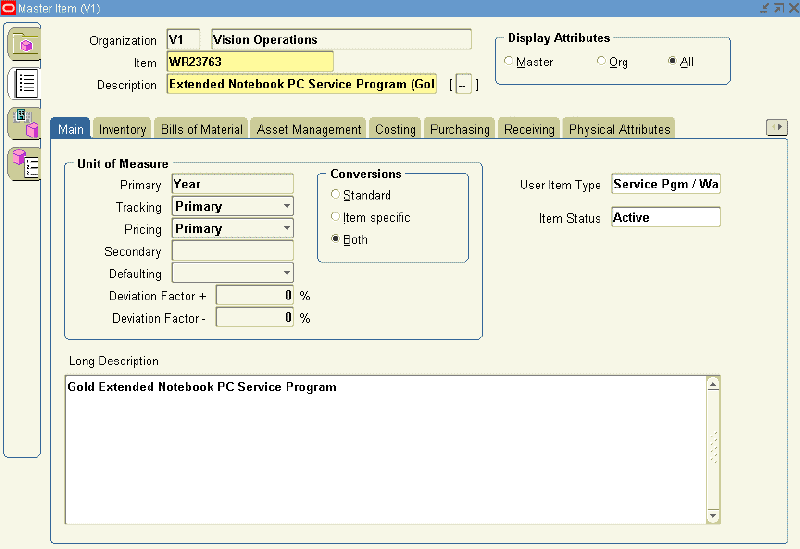
    5. From the Main tab:
      1. Select the User Item Type, Service Pgm / Warranty.
      2. Select a unit of measure (UOM), from the Primary LOV.

        Note: You set up a service using a time UOM, such as Year, not a quantity UOM, such as Each.

        the picture is described in the document text
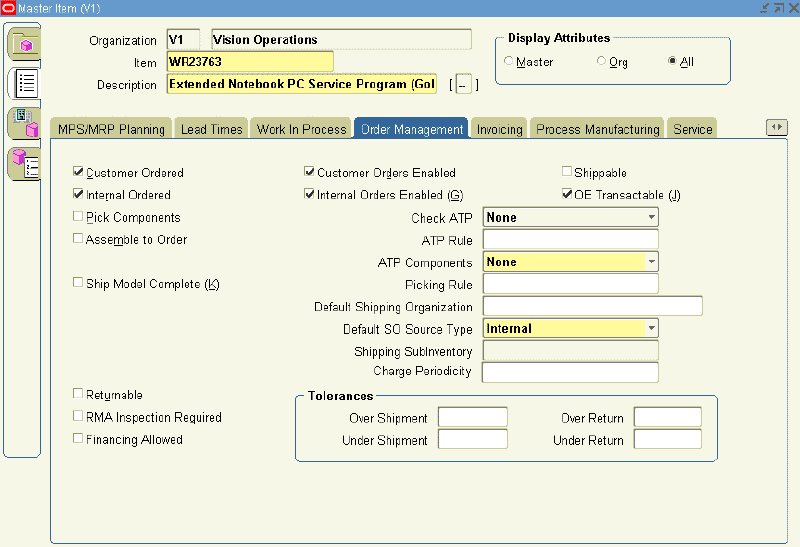
    6. Select the Order Management tab: 

      the picture is described in the document text
      1. Select the Customer Ordered check box.
        The Customer Orders Enabled check box is automatically selected.
      2. Select the OE Transactable check box.
      3. Select the Internal Ordered check box.
        The Internal Ordered Enabled check box is selected automatically. 
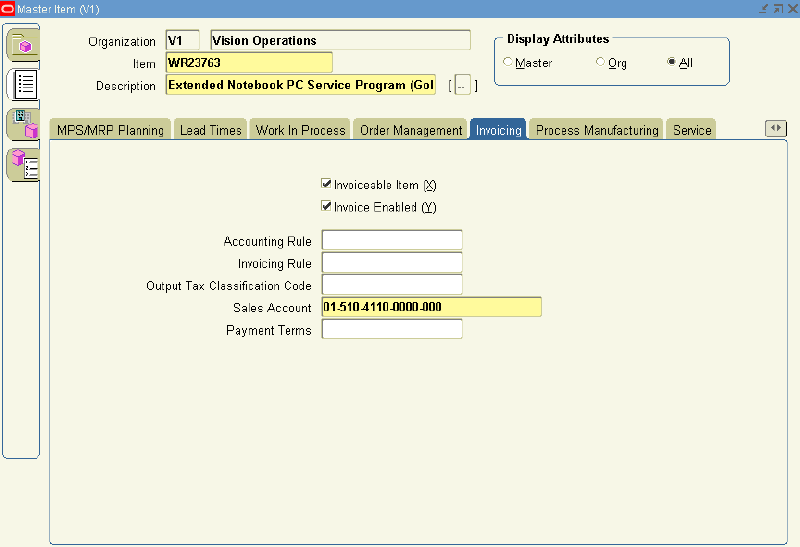
    7. Select the Invoicing tab:

      the picture is described in the document text
      • Select the Invoiceable Item and Invoice Enabled check boxes
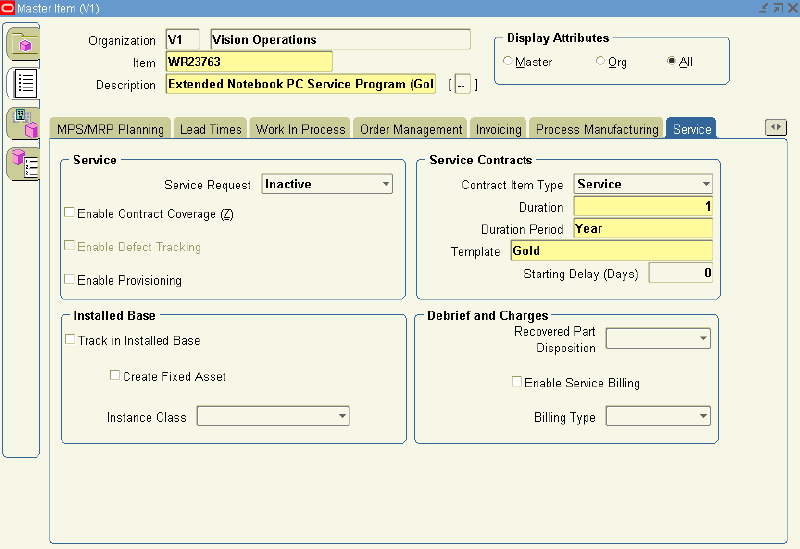
    8. Select the Service tab.

      the picture is described in the document text
      1. In the Contract Item Type, select Service from the LOV. 
      2. Select a Duration and Duration Period.
        The duration and duration period are used for passing the service duration for the service item, when it is selected in the Oracle Quoting application.
      3. From the Template LOV, select a coverage template.
    9. Save.

     
    Design by Free WordPress Themes | Bloggerized by Lasantha - Premium Blogger Themes | Justin Bieber, Gold Price in India